The Tesla logbook for iPhone
Every drive, remembered.
A permanent, private record of yourdrives
Sign in with Tesla and the car starts streaming. No dongle, no OBD port, no five-minute polling — signals arrive the second they change.


From €6.99/month · 7-day pass €1.99 · no ads, no data resale
Live from the demo car, right now
- 0
- drives logged
- 0
- km tracked
- 0
- charge sessions
- 0
- kWh added
Inside the app
Built for the questions you ask about your car
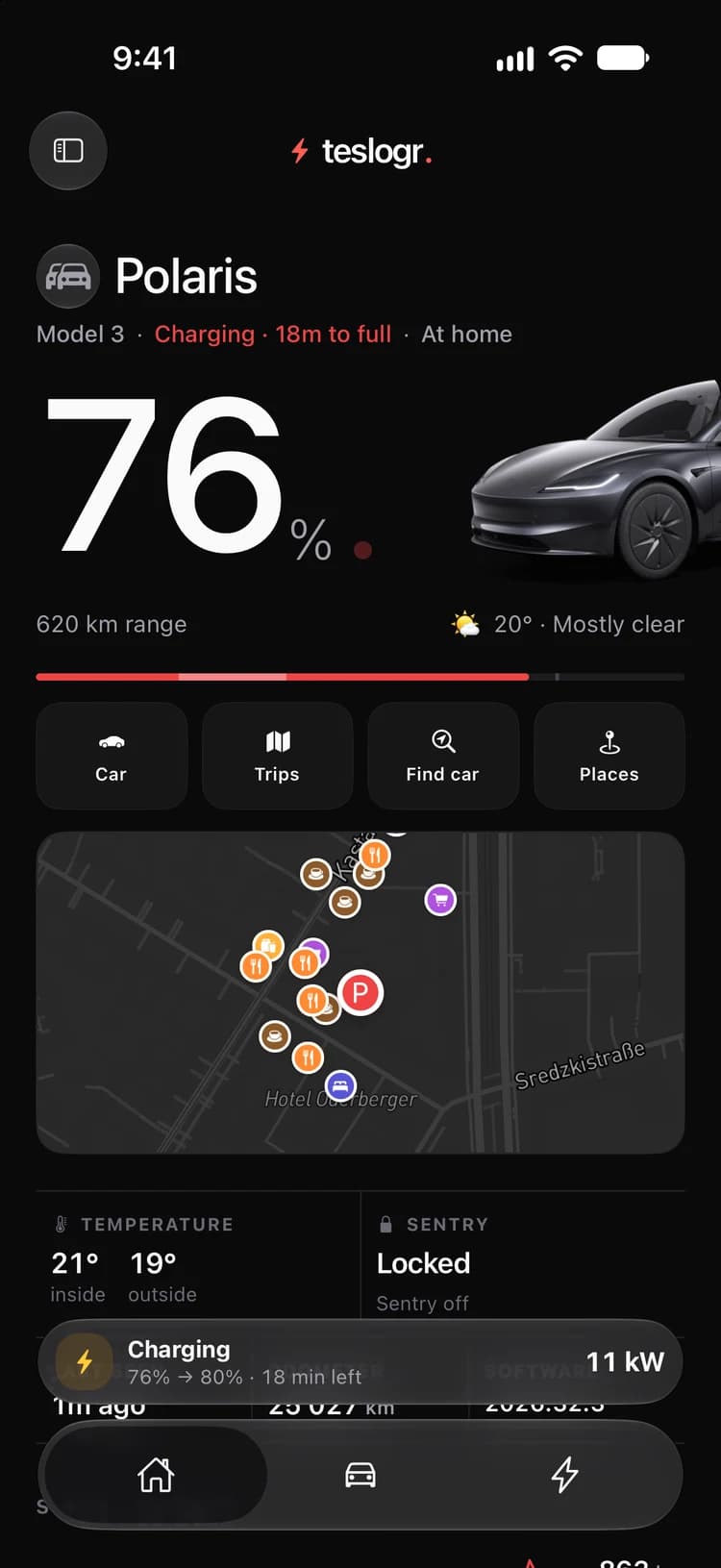
01 · Home
The car, at a glance
Charge level, range, where it is and whether it is locked — the second you open the app, without waking the car.
- Battery, range and time left on the charger
- Inside and outside temperature, locks and Sentry
- What is around the car when it is parked
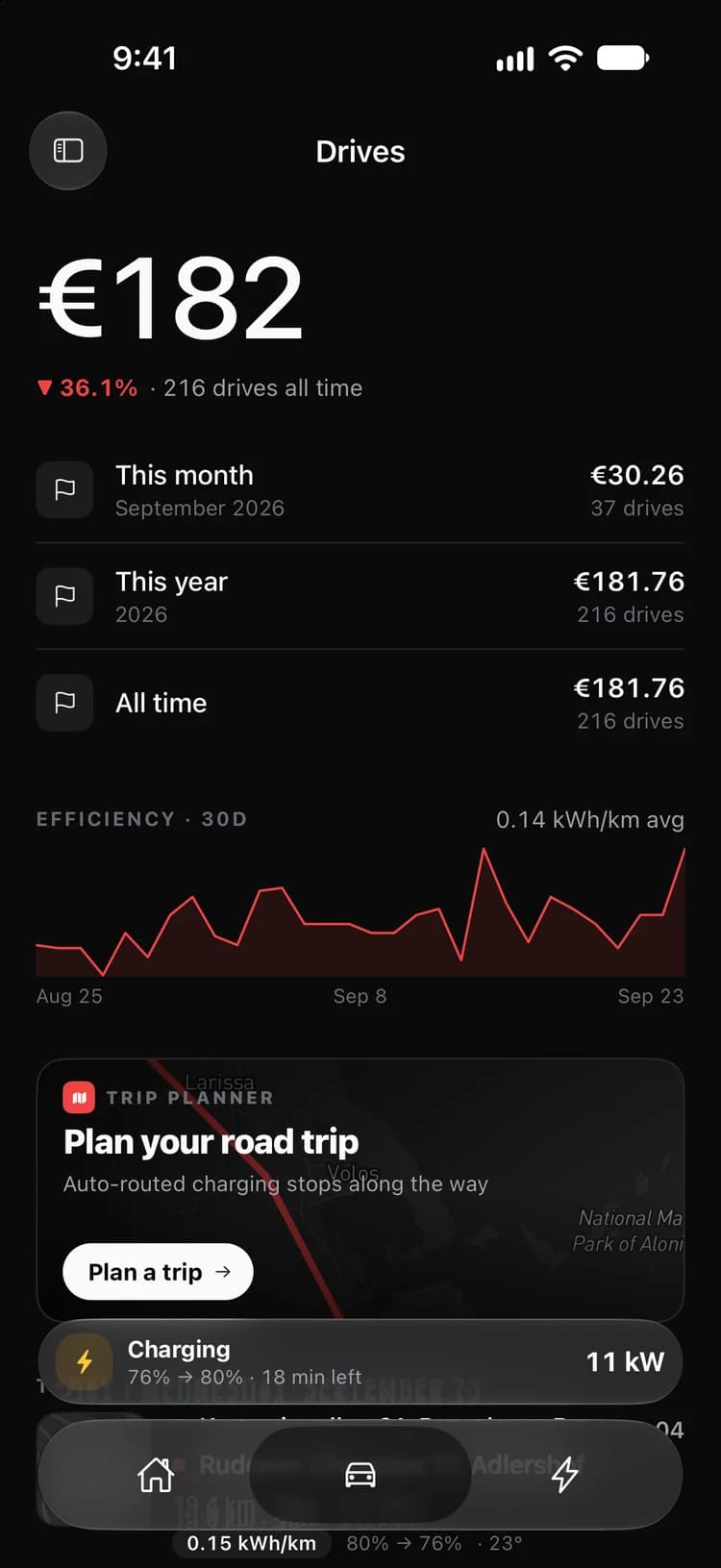
02 · Drives
What your driving costs
Every trip is logged with its route, energy and price. Month, year and all-time totals add themselves up.
- Cost per month and year, priced at your tariff
- Efficiency over the last 30 days
- Every drive listed with its route, distance and cost
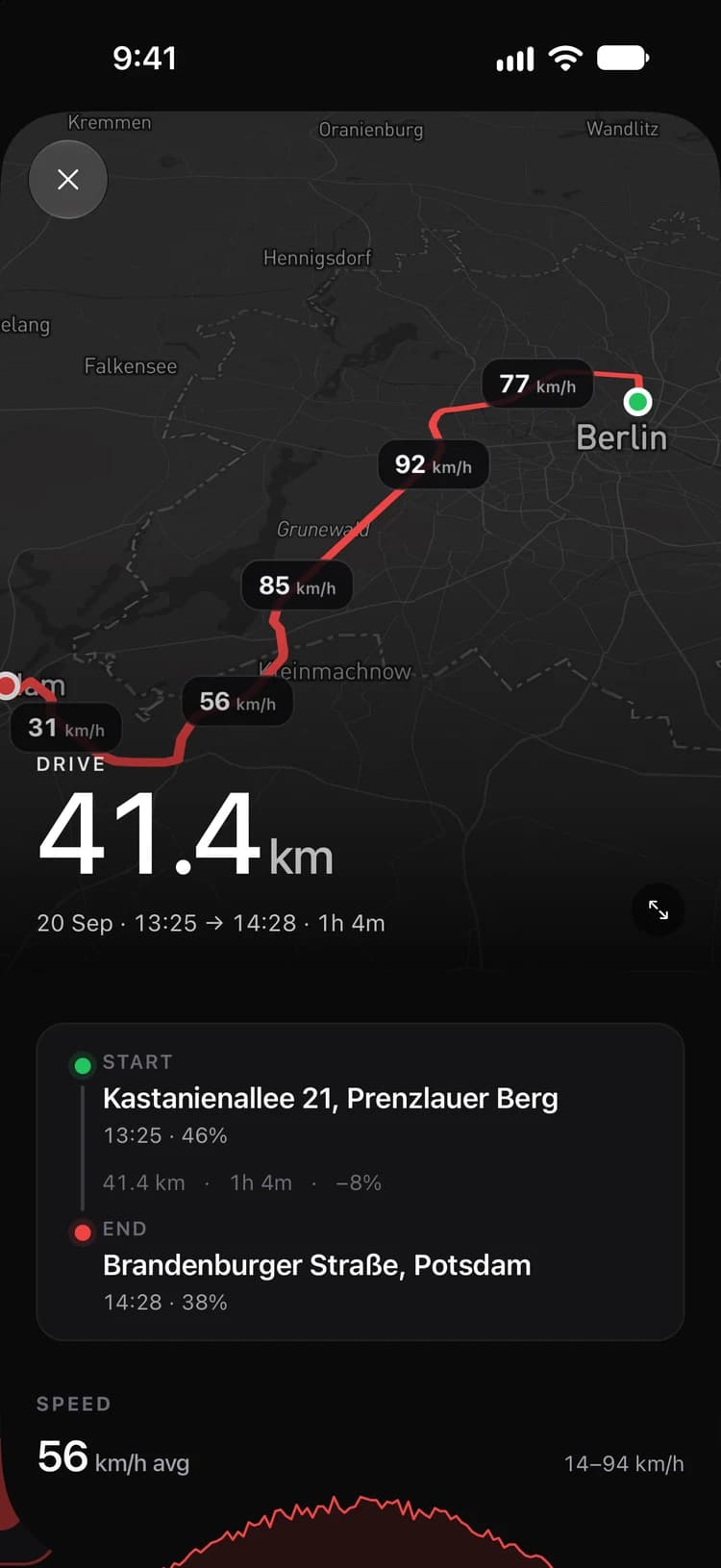
03 · Replay
Any trip, replayed
Open a drive and see the road you took, how fast you went along it, and what it did to the battery.
- The real route on the map, with speed along the way
- Start and end address, time and state of charge
- A speed chart and the energy the trip used
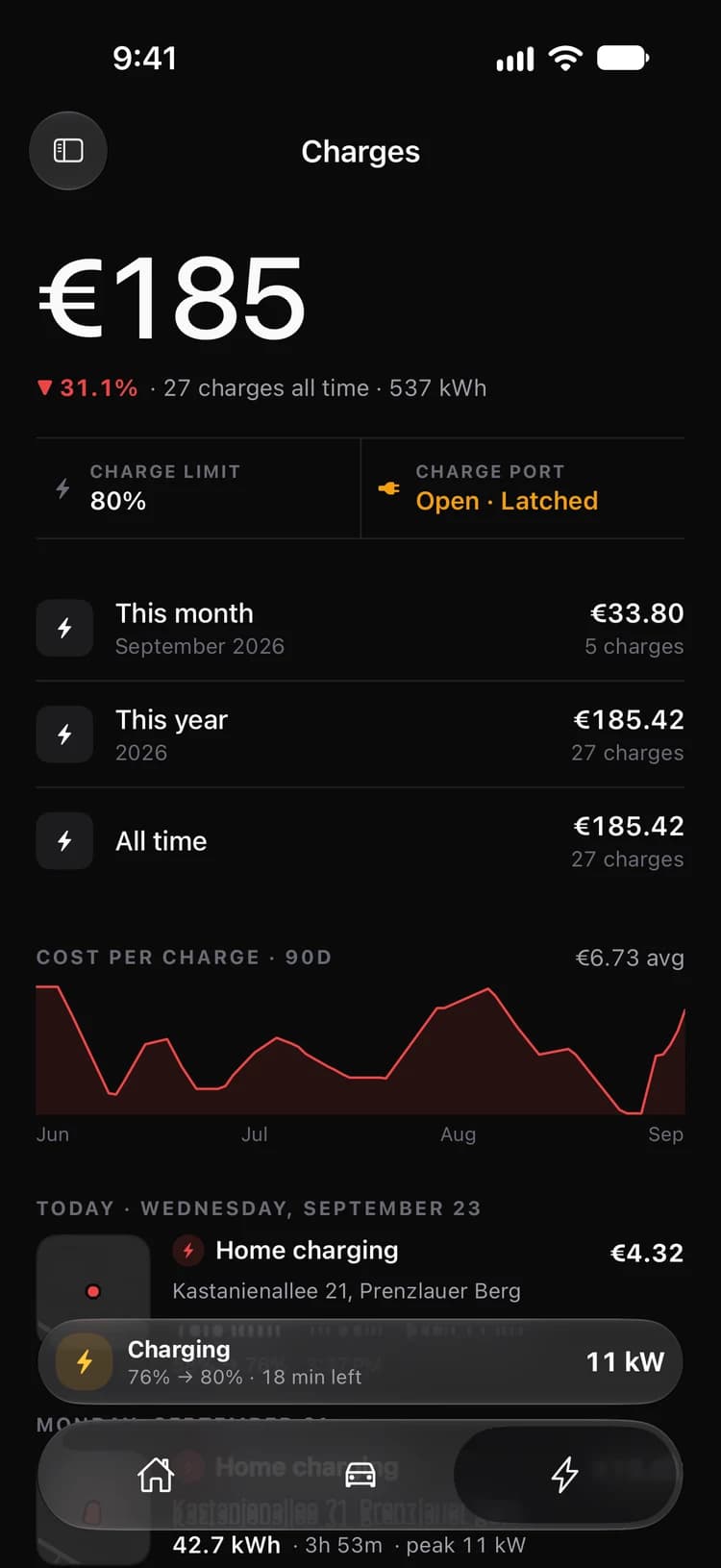
04 · Charges
Every charge, priced
Home, Supercharger or destination — each session with energy added, peak power and what it cost.
- Charge limit and charge port state at a glance
- Cost per charge over the last 90 days
- Month, year and all-time charging spend
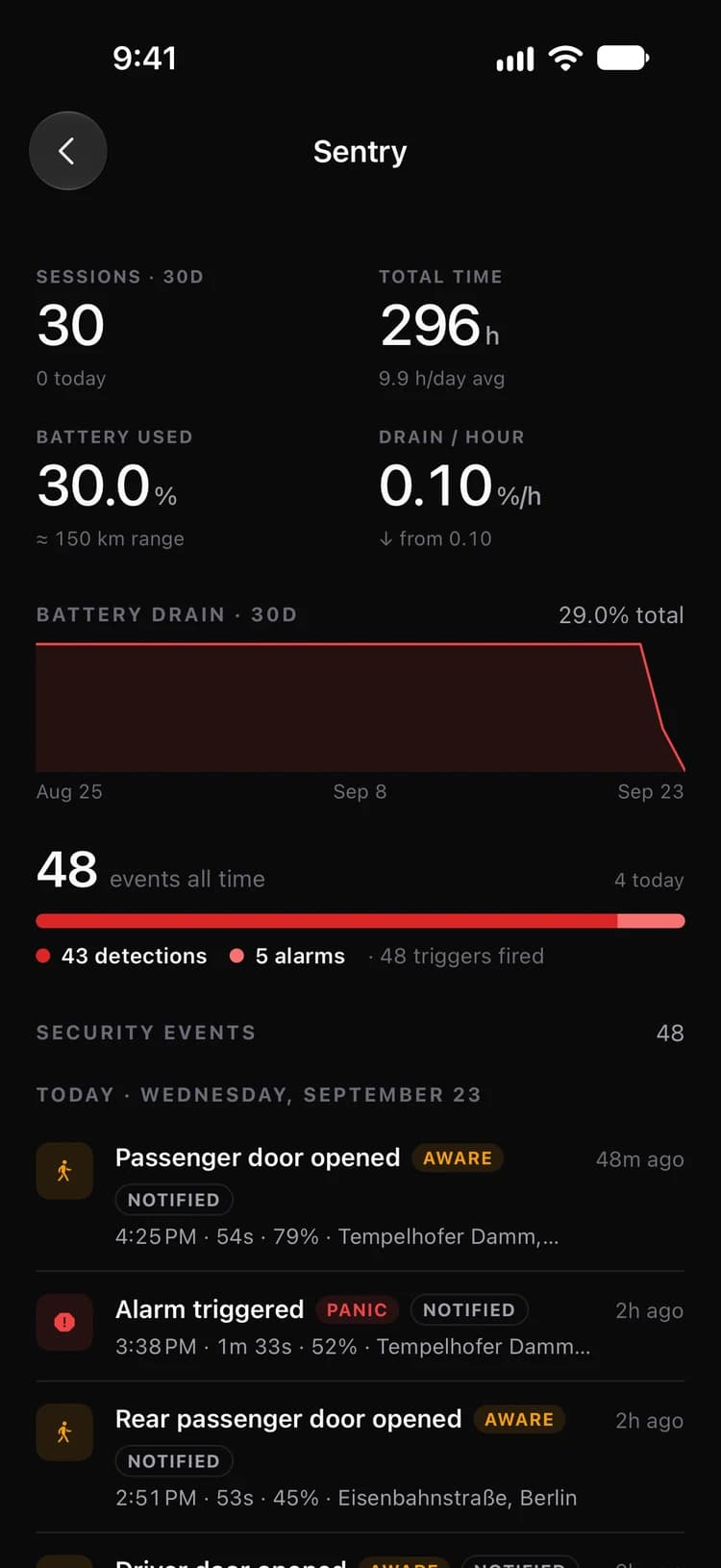
05 · Sentry
Who came close, and what it cost
Sentry alerts grouped by place and time, with the battery each session drained.
- Door, motion and alarm events as they happen
- Street addresses for every event
- Drain per hour so Sentry never surprises you
Everything it tracks
A black box recorder for your Tesla
Drives, charges, battery, Sentry, trips — captured automatically from the moment you sign in. Every plan gets every feature.
Munich
Depart 90%
Ulm
Arrive 31% · 18 min
→ 72%
Karlsruhe
Arrive 24% · 14 min
→ 65%
Frankfurt
Arrive 38%
Trip planner with charging stops
Chargers picked for your car and your charge limit, arrival percentage at every stop, elevation along the way. Then send the route straight to the car.
Take your data with you
Export drives and charges as spreadsheets, and every route as GeoJSON for any map tool.
Arrived at Home
Model 3 · 18:42
Front-left tire 2.4 bar
Below 2.7 bar threshold
Window open, rain expected
Rear left · Office, Mitte
Alerts & geofences
Arrive/leave alerts for places you draw, plus vampire drain, low tires and open doors.
Every charge, priced
Supercharger, home, destination or third-party DC — energy, cost per kWh and the curve.
Wh/km by outside temp
Insights
Efficiency by temperature and speed, monthly spend, vampire drain, lifetime milestones.
Up to five cars
Switch cars in a tap. Plans differ only in how many cars they cover and how far back history goes.
Beyond the app
Lock Screen, Home Screen, wrist
Charging and driving follow you into the Dynamic Island. Widgets and Watch complications answer “how much charge?” before you unlock.
Live Activities
Starts itself when the car plugs in or shifts out of Park.
Home Screen widgets
76%
342 km range
Alexanderplatz Garage
21°
Outside 14° · Off
Locked
Sentry armed
Also: Tires, Overview and Charge cost.
Apple Watch
Complications for battery, range, climate, locks and tire pressure — glanceable from the watch face.
How it works
Three steps, then it runs itself
Link your Tesla
Download the app and sign in with your Tesla account. Teslogr registers with the Fleet API and configures telemetry on the car — no hardware, no OBD dongle.
Telemetry streams
The car pushes location, battery, climate and charge signals the moment they change. No polling, so a sleeping car stays asleep.
History accrues
Drives, charges and Sentry sessions assemble themselves. A year later you can replay any trip you took.
Live preview
Real data, not a mockup
Everything below is read straight from the demo fleet's database — the same drive you'll see when you open the dashboard.
11.8 km
last drive
141 Wh/km
efficiency
41%
battery now
1,768 kWh
charged so far
The demo account is a real Teslogr instance seeded with three months of Athens driving. No sign-up, nothing to configure.
Privacy
Where your car goes is nobody's business
A logbook knows where you live, work and sleep. It should be built by people who charge you money, not by people who sell your data.
No ads, no resale
You pay for the product, so your driving is never the product. Location history is not sold, shared or used for profiling.
Official Tesla access
Sign-in goes through Tesla’s own OAuth. Teslogr never sees your password, and you can revoke access from your Tesla account at any time.
Private by default
Your drives, places and routes are visible only to you, behind your login. Nothing is published, and a route only leaves the app when you share it.
Kept if you leave
Cancel and everything already recorded stays in your account. Come back and recording picks up where it stopped.
Pricing
One subscription, per car
Teslogr streams from your Tesla around the clock, and Tesla meters that streaming by the vehicle-hour. The subscription pays for the cars you track — no ads, no data resale, no free tier quietly running up someone else's bill.
Pro
One car, the last three months
€5.00/month — saves 28%
- 1 vehicle
- Last 3 months of history
Plus
Most popularTwo cars, the last year
€8.33/month — saves 31%
- 2 vehicles
- Last 12 months of history
Fleet
Five cars, every drive ever
€15.00/month — saves 25%
- 5 vehicles
- Your full history
Every plan includes the whole app
- Live streaming from the car
- Geofences and smart alerts
- Live Activities and widgets
- Trip planner with charging stops
- Insights, efficiency and forecasts
- Sentry events and sessions
- Export drives, charges and routes
Subscriptions are sold through the App Store and billed to your Apple Account. The 7-day pass is a one-time purchase that does not renew and expires on its own. Plans renew at the price above unless cancelled at least 24 hours before the period ends. Change tier or cancel any time in App Store settings.
FAQ
Questions, answered
Which cars work?
Any Tesla that supports Tesla’s Fleet API and Fleet Telemetry. The car needs recent software for streaming, and Teslogr checks this during setup.
Do I need hardware or a dongle?
No. Teslogr uses Tesla’s official Fleet Telemetry. After you sign in, it registers with the car over the air, and the car starts streaming. Nothing plugs in.
Does it drain my battery?
No. The car pushes changes by itself, so Teslogr never has to wake it to poll. A sleeping car stays asleep.
Why is there no free tier?
Tesla bills streaming per car, per hour. A free tier would be paid for with ads or with your data. Try it instead with the 7-day pass for €1.99, which does not renew.
What is the difference between the plans?
Only the number of cars and how far back your history goes. Pro covers one car and the last 3 months, Plus covers two cars and the last 12 months, and Fleet covers five cars and every drive ever. Every plan gets every feature.
Can Teslogr control my car?
No. Teslogr reads data and never unlocks, drives or changes settings. A planned trip can be shared to the Tesla app, which sends it to the car’s navigation.
What is the web dashboard?
The same account on a big screen, with maps, drives, charges and charts. The live demo on this page runs on it.
What happens to my data if I cancel?
Streaming stops when the subscription ends. Export your drives, charges and positions first if you want to keep a copy.
Does it work with Android?
Not yet. The app is iPhone and Apple Watch only. The web dashboard works in any browser.
Start remembering every drive.
Two minutes to set up. Seven days for €1.99 if you want to be sure.